

I've been meaning to put to the test the claim made by Manton in his piece Comparing Ghost and Micro.blog, quote:
If you need a paid email newsletter, Ghost is a great choice. If you need a blog or podcast, there are limitations in Ghost that would make me recommend something else. People who use Ghost tend to have a different platform for microblogs, for example, instead of being able to unify everything under a single custom domain name and platform.
Ghost is indeed best in class when it comes to newsletters, but I would argue the same holds true for blogging. I never used it for anything other than blogging and I remember the times when it didn't have email features at all. The one missing feature, for some, might be the limited commenting options. Obviously there are workarounds.
What got me curious, though, was the microblogging mention. It's true I have never considered using Ghost for this purpose, but would it really lack any features? I decided to explore this idea to see where it would take me. Come join me on this exciting journey.
I realize there's probably twelve million different definitions and meanings behind what microblogging really is, but to me it boils down to rather simple requirements:
- No title posts
- Short form
- Mainly status updates
- (Optional) Syndication/cross-posting
This was my mental model when I started digging in. Let's get the first point right out of the way: it's impossible to have no title in posts in Ghost. I knew that and I also knew how I'd want to address it:
- Hide the title completely at the theme level
- Use the title with fixed format to auto-generate unique slugs
- Remove title from syndication
With this approach I'm able to create posts like /status-1769167820 while pretending the title isn't there at all. I know, this is cheating, but bear with me.
The second point, short form, is fine, it's really up to you how long your posts are going to be. I decided not to impose any artificial limits in this regard.
The vast majority of the content, ideally, should be status updates. Again, I decided against imposing anything here and just let it flow naturally.
As you are most likely aware, Ghost 6.0 has shipped with native ActivityPub support:
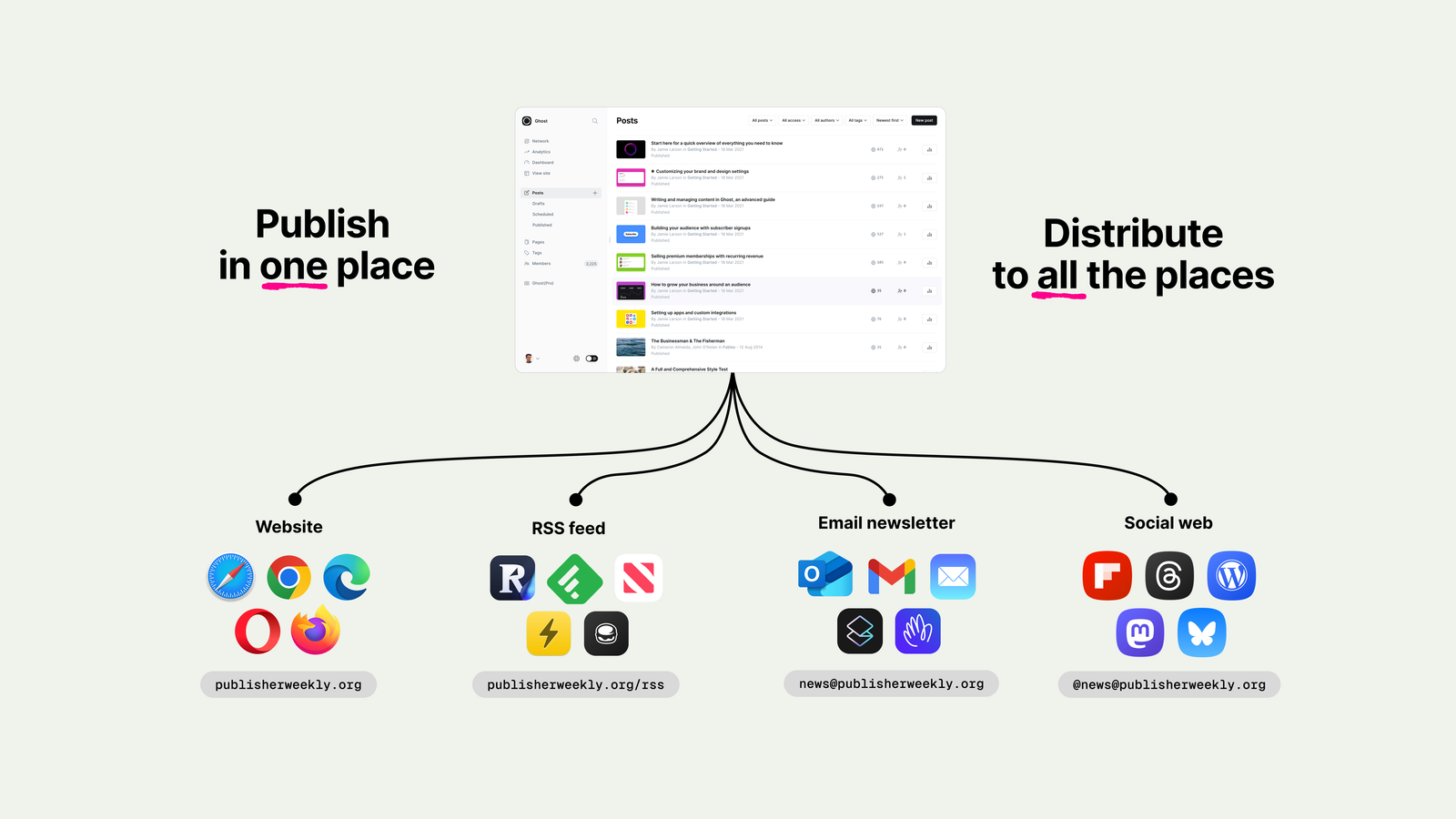
If this is enough for your needs, then syndication is handled. I didn't want to spin up a separate account for ActivityPub but instead use my existing social accounts, specifically Micro.blog and Mastodon. I needed to make sure I wasn't going to pass the post title, so there's also that.
I went with the wonderful service called EchoFeed, which handles most of my cross-posting needs. The beauty lies in its simplicity—grab an RSS/JSON feed and push to defined services on an update. Perfect 👌🏻
Next step: finding a suitable theme. If I'm being honest, it all started with me stumbling upon this theme. If you haven't heard of Priority Vision yet, I strongly encourage you to check out their themes. (Yes, the blog you are reading right now is also powered by a theme made by them.) Without further ado, here's Feed:
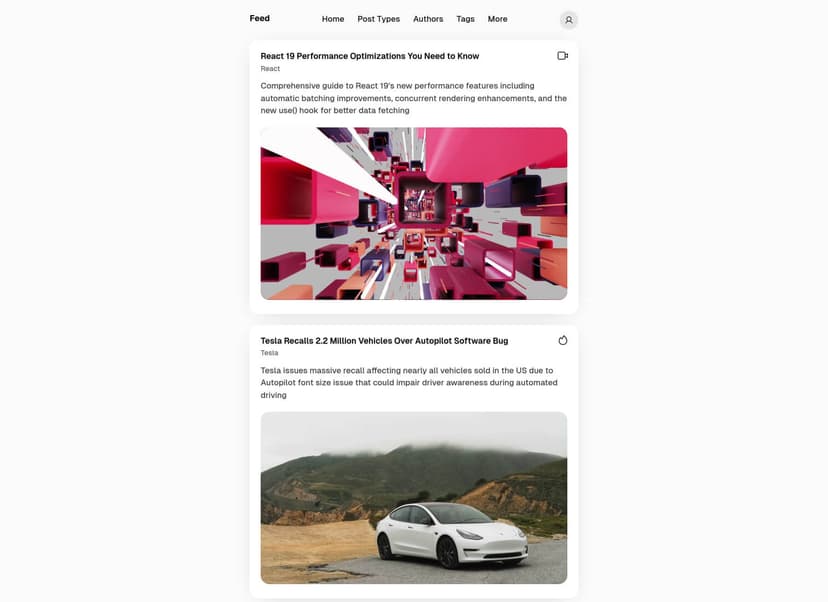
All the tweaks I deemed necessary are bound to tagging. There are 4 post types I wanted to tackle:
- Status, of course, no title here
- Links, where title is linking to the external article in a Daring Fireball style
- Changelog, where I'm posting updates from some of my side projects, similar to Links where the title links to the external article
- Micro.blog, which receives updates from my account's 365 category and reposts them
Having each type stored in a separate tag allowed me to easily differentiate between the post types. And this is how daFeed was born:


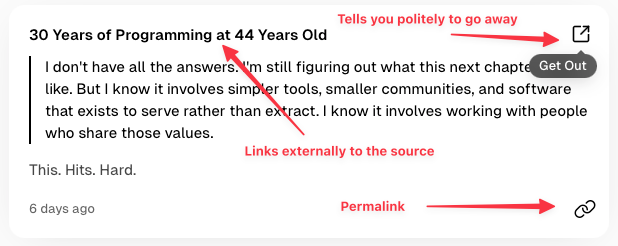
Here's an example of each post type: status, link, changelog and micro.blog. Most of them required some minor tweaks in the theme. For example, external links are (ab)using the canonical_url feature buried in the metadata of post settings in Ghost—this way I can default to linking to another site (something I've been doing on this very blog as well).

Theme changes to make it fly ✈️
Changes in the Feed theme were minimal. Handlebars perhaps aren't the most beautiful (to be fair, no templating is, I'm looking at you jinja 👀), but they accomplish the task really well. I removed the entire header from the status posts part (which includes things like authors, title and tags) by simply wrapping it in the {{^has tag="Status"}} helper. For links, changelog and micro.blog-tagged posts I switched to using {{canonical_url}} for its link destination. Everything else (like icons etc.) was just cosmetic tweaks to better match what I had in mind.
Quick side note: Priority Vision provides instructions on how to set up GitHub Actions for automated theme deployment. I highly recommend going this route. What I usually do is keep three, completely separate branches which are named: main, upstream and pristine-zip (if you've ever used git-buildpackage you know where it comes from). pristine-zip stores the untouched, non-modified compressed file that I'm simply versioning. upstream is simply the theme without any of my modifications. Finally, main is essentially upstream with my modifications on top. When new version is released, I store the new zip in pristine-zip, then I uncompress it in upstream and deal with all the changes made there, and then I rebase main on top of upstream. You're welcome.
Once all the tweaks were in place, I ended up with the following plan for cross-posting:
┌───────────┐                                  ┌───────────┐
│ Changelog │────────┐                ┌───────►│ Mastodon  │
└───────────┘        │   ┌────────┐   │        └───────────┘
                     ├──►│ daFeed │───┤
┌───────────┐        │   └────────┘   │        ┌───────────┐
│Micro.blog │────────┘                └───────►│Micro.blog │
└───────────┘                                  └───────────┘
Getting stuff out is a solved problem via the RSS + the EchoFeed service. But the other way around introduced a little bit of friction. Sure, Ghost has a really good and well-documented API, but that API is specific to Ghost—this means that third-party tools need to specifically implement it as opposed to using some kind of standard. (Worth noting that there are quite a few integrations out there, most notably from iA Writer and Ulysses.)
What's that changelog? It's a series of updates in my Debian PPA. Nothing too fancy, but Zensical doesn't provide automatically generated RSS feeds. A website without an RSS feed is a problem I already solved in the past, so I decided to slightly adjust it to a one-off script that runs during the website generation:
#!/usr/bin/env -S uv run --script
# /// script
# requires-python = ">=3.13"
# dependencies = [
#     "beautifulsoup4",
#     "soupsieve",
# ]
# ///

import json
from bs4 import BeautifulSoup
from datetime import datetime

with open("site/changelog/index.html", "r") as f:
    soup = BeautifulSoup(f, "html.parser")

site = "https://deb.chabik.com/changelog"

feed = {
    "version": "https://jsonfeed.org/version/1.1",
    "title": "Debian PPA Changelog",
    "home_page_url": site,
    "feed_url": f"{site}/feed.json",
    "description": "Changelog for Debian PPA",
    "language": "en",
    "items": [],
}

for h3 in soup.select("article h3"):
    uls = []
    for sibling in h3.find_next_siblings():
        if sibling.name == "ul":
            uls.append(sibling)
        elif sibling.name == "h3":
            break

    feed["items"].append({
        "id": h3["id"],
        "url": f"{site}{h3.find('a', class_='headerlink')['href']}",
        "title": h3["id"],
        "content_html": "".join(str(ul) for ul in uls),
        "date_published": datetime.strptime(
            h3.find("small").get_text(strip=True), "%B %d, %Y"
        ).strftime("%Y-%m-%dT%H:%M:%SZ"),
    })

with open("site/changelog/feed.json", "w") as f:
    json.dump(feed, f, indent=2)
I love the uv ability to automate Python scripting execution
Because Zensical is simply a static site generator, I can just do a quick update of the markdown files, run the update and finally "scrape" the HTML file for changes to generate a JSON Feed. One rsync later, changes to the website with the accompanying feed are out in the wild.
Well OK, I've got a feed, but how do I post on updates to Ghost? EchoFeed, sadly, doesn't support Ghost. I already wrote my own Tooting Mechanism, which, in essence, fetches Ghost's feed and publishes the update to my Mastodon (Tootly). Here I needed something similar, only in a somewhat reversed mode. I quickly adapted the script and while it's a bit more complex, it does exactly what I need it to do. I called it GhostFeedMe because I am simply this good with naming things (more to come, trust me, you are in for a real treat).
How does it work at the moment? It's a periodic job running in my local Kubernetes, in pretty much the same fashion as Tootly. There are some key differences, however. Tootly is not stateless: it's using SQLite on a PVC to ensure there are no duplicate posts landing on my Mastodon (especially in a loop). In this case, I already have the state—it's in Ghost, the post is either already published or it isn't, but I should be able to check in within Ghost, ergo GhostFeedMe can remain stateless. The second difference is the config part. Tootly supports 1:1 pairing, meaning it can work with a single service and a single Mastodon instance. That's it. GhostFeedMe, on the other hand can be set up flexibly with an array:
[
  {"name": "debian-ppa",
   "url": "https://deb.chabik.com/changelog/feed.json",
   "prefix": "Debian PPA"},
  {"name": "microblog",
   "url": "https://micro.chabik.com/categories/365/feed.json",
   "prefix": "Micro.blog",
   "tag": "Micro.blog"}
]
I know, it's not the most beautiful, but I'm happy with the result. This way I can scan two feeds I'm interested in posting updates from, check whether the latest post has already been posted and take action accordingly afterwards. Run it every 15 minutes, 1 hour, whatever floats your boat.
With two-way cross-posting out of the way, there were two more things I wanted to address:
- Posting from my Terminal
- Posting from my phone
I guess both are pretty much the same problem: rapid posting. I knew these were going to be my internal-use-only tools, so I knew drafting something fast would be just fine. Terminal went first and that's how ghoster was born:
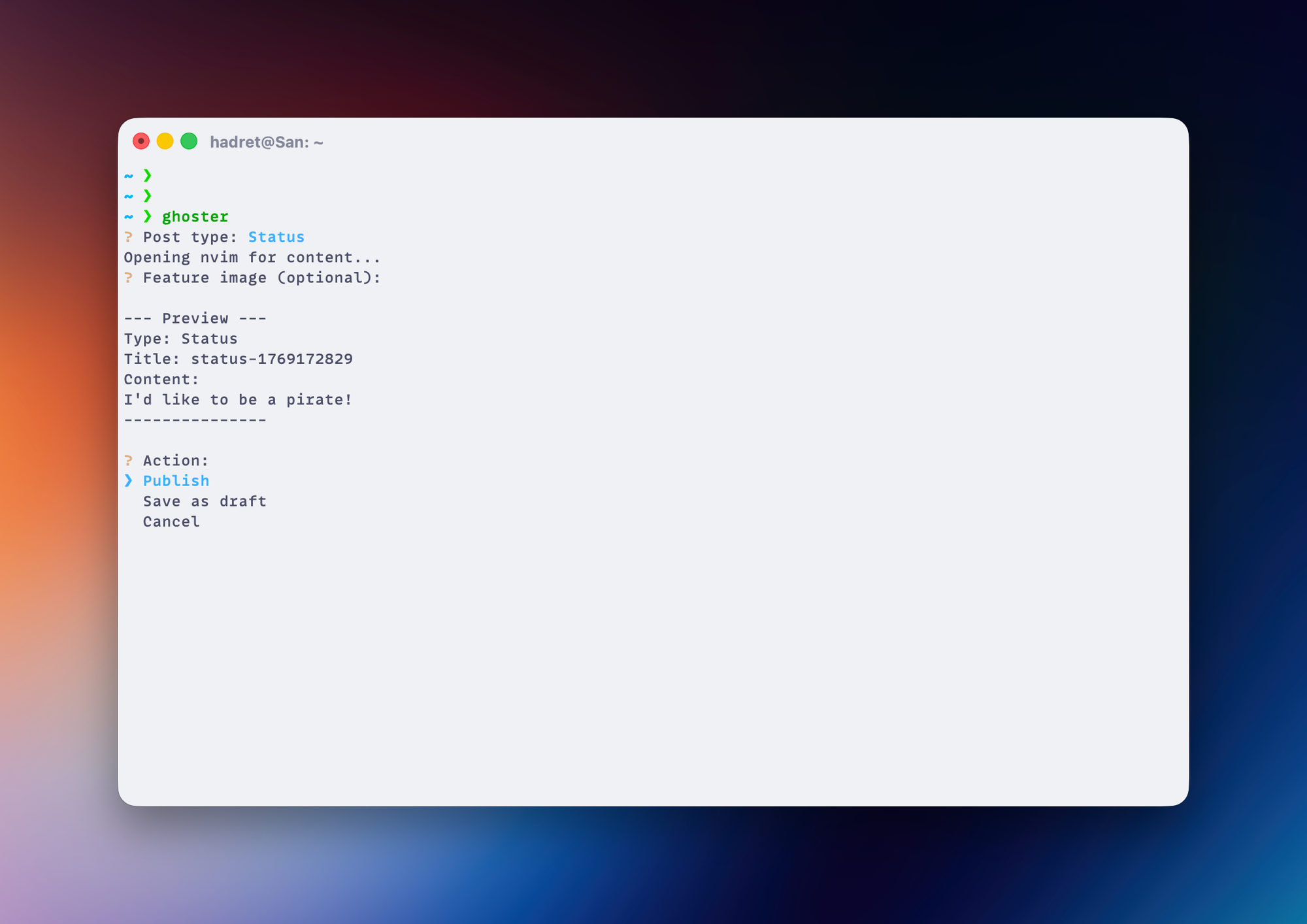
The flow is simple: choose between a status and a links post, open neovim to enter the content, provide a local path to an image if you want it featured in the post and then either publish the shit out of it directly or simply save it as a draft for later posting. A lot of stuff is done for me in the background, like handling the image upload and setting the title and the tag, I can just smash it real fast and publish in seconds. Adding a links post is a bit more involved as this one requires title and canonical_url in addition to the content, but that's roughly it and the rest of the flow remains the same:
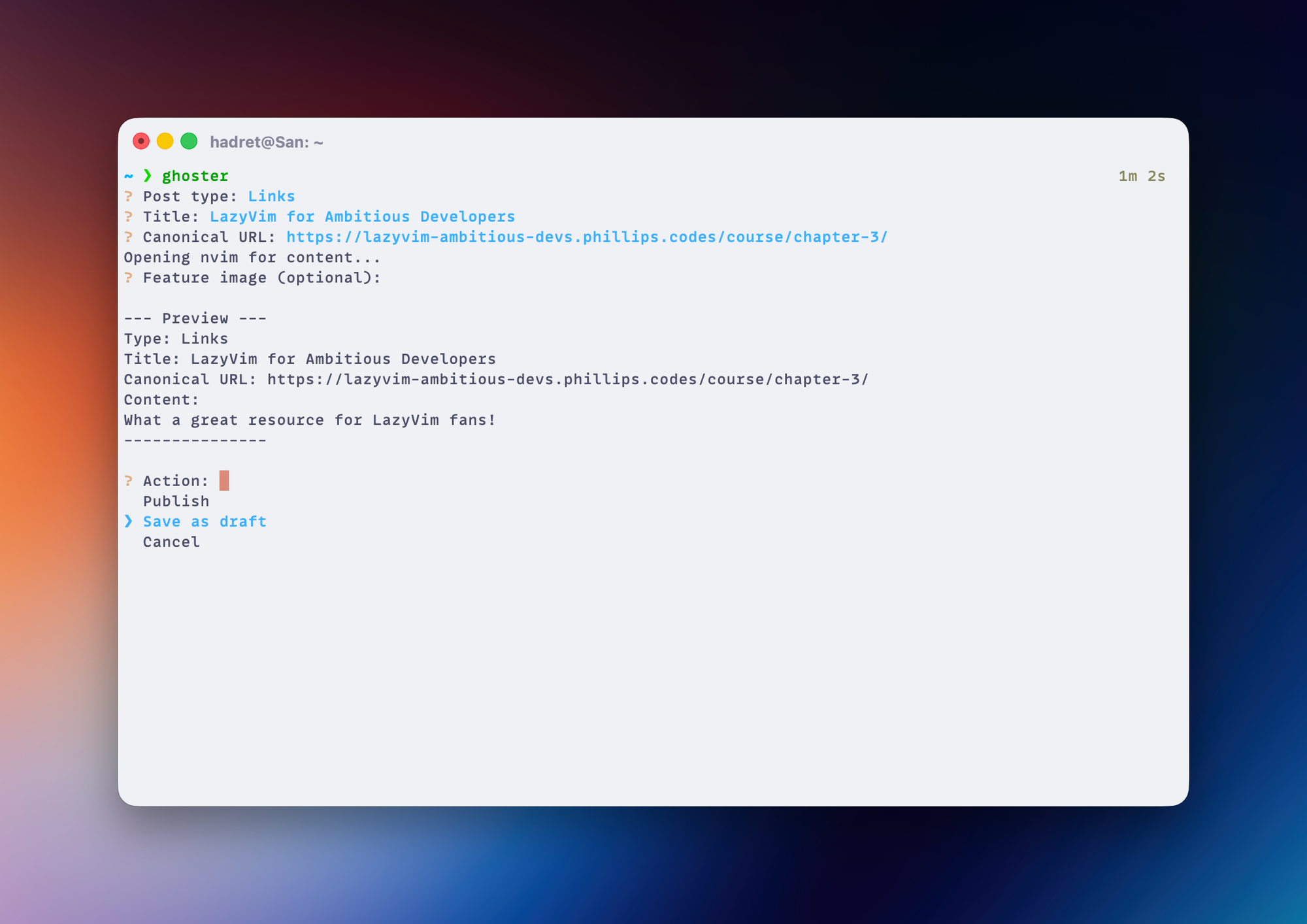
This script is so specific to my particular needs that it remains in its dirty, unpublished state. Should there be any interest in making it public, I'm happy to oblige (but won't hold my breath 😂)
While it works great in my terminal, I still needed a solution for my phone. Sadly, I'm not as talented as Sodo in pretty much anything in my life, but most importantly in building an iOS app, so I had to resort to things I already know well: HTML, CSS and FastAPI. I wanted more or less the same flow as I have in ghoster. I knew that I wouldn't need any sort of authentication as I'm going to run it locally-only (at least initially), so I quickly stitched a bunch of things together and ended up with GhostMe (I told you it's gonna be an awesome payoff with the names and you didn't believe me!):
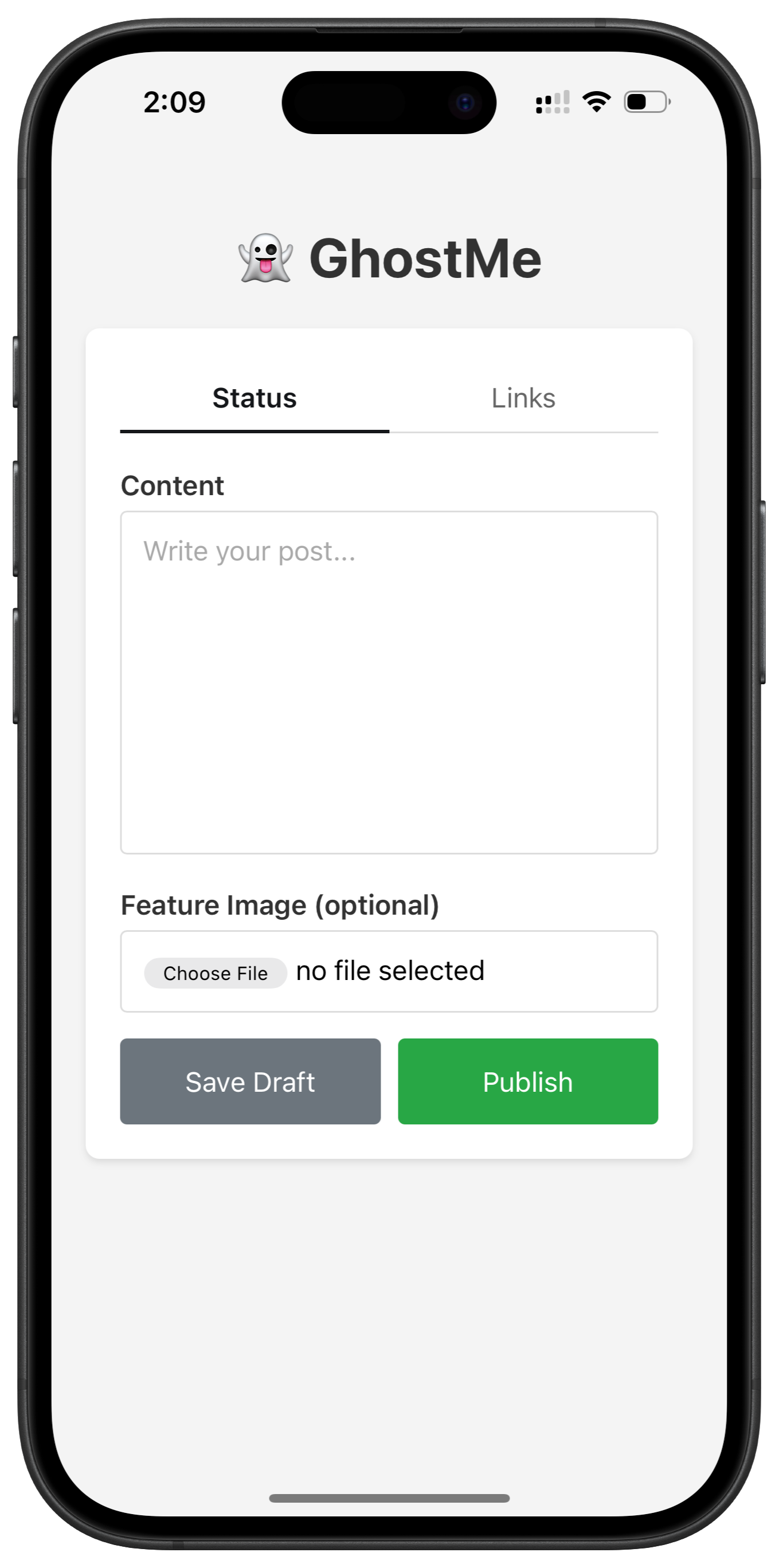
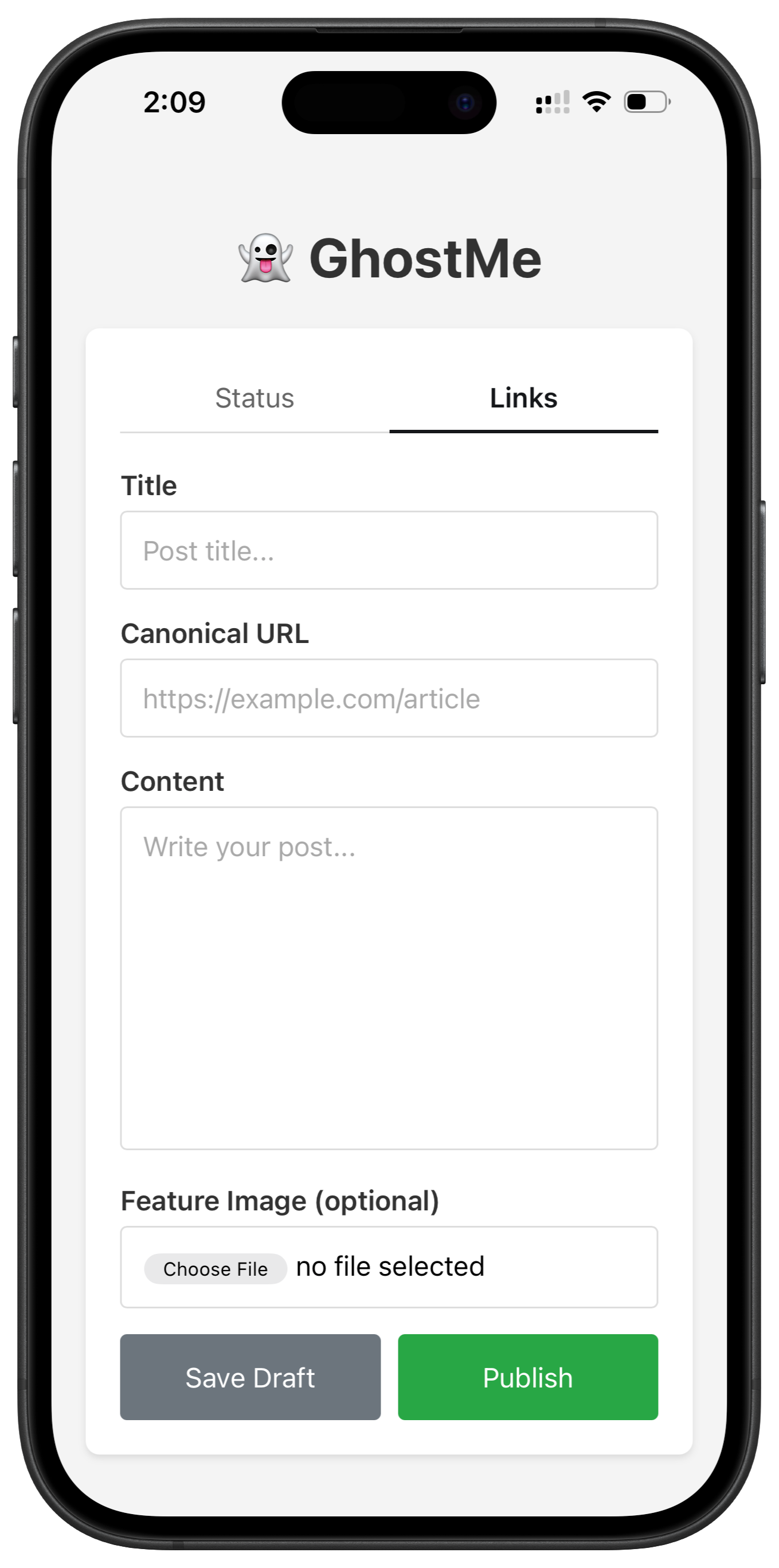
This was made using Safari's "Add to Home Screen" feature and, I say, it's good enough™
With the amazing trio (ghoster, GhostFeedMe and GhostMe 🥰) and the Feed theme by Priority Vision, I'm really digging this overall setup. Posting short status updates to Ghost is very fast, all of the syndication going on (both ways) is always on time and spot on. I must admit it all turned out better than expected and daFeed is here to stay.

Discussion